Simulate card transactions
Learn how to simulate various card payment scenarios in our staging environment. This guide covers how to test different outcomes, such as approved transactions and reversals.
Note: The set of endpoints below is only available and enabled in the staging environment. These endpoints will allow you to simulate card authorizations and reversals before the live environment.
Prerequisites
- For programs with standard accounts, the user account should be enough balance to cover the simulated transaction amounts.
- For programs with mJIT accounts, the must meet the following requirements:
a. The Pre Authorization webhook for Shared Authorization must be subscribed.
b. The Pre Authorization partner response must be sent within the alloted time.
c. The program prefund must have enough balance to cover the intended simulated transaction amounts.
Debugging
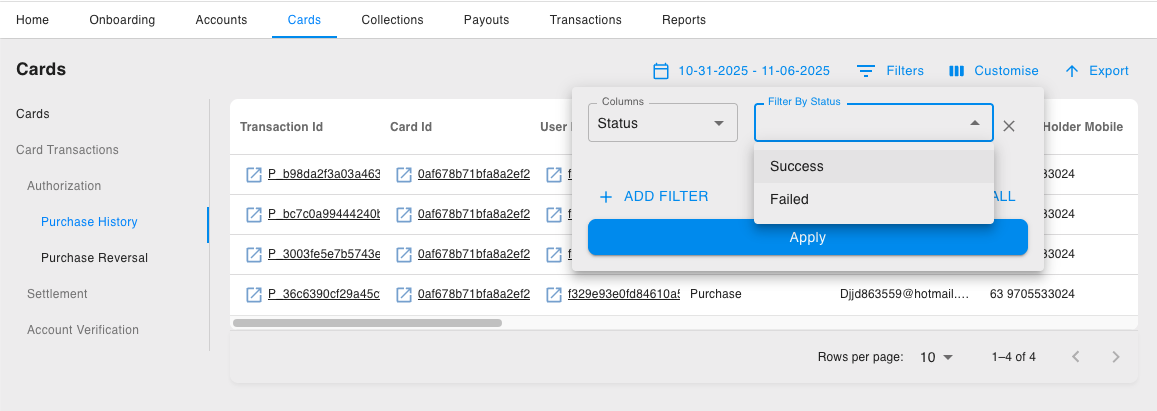
For simulation failures, you can go to the AdminNet dashboard > Cards > Purchase History. Then on Filters > select Status > where status is Failed to reveal your simulated transaction and its reason for failure.
Figure: Adminnet dashboard - Card Transactions
Simulate Card Authorizations
The following mock payload is required to initiate a card transaction authorization request. Partners will need to follow the payload field definitions stated below. Refer to the simulated card authorization API call on the right.
Payload Definition
| Network defines the network for transaction, e.g. MASTER, VISA |
| Channel defines the channel for transaction, e.g. POS, ECOM, ATM |
| Card ID of the card to be used for transaction |
| Currency code of the card (Use ISO4217 value of currency), e.g. SGD, USD, PHP |
| Card transaction amount in local currency |
| Currency code of the transaction (use ISO4217 value of currency), e.g. SGD, USD, PHP |
| Transaction amount |
| Terminal ID of the POS used in the transaction. (should be 8 characters in length) |
| Merchant ID of the merchant in the transaction |
| Merchant name |
| Merchant category code (MCC) |
| POS Entry Mode Code allowed values:
|
| First 10-digit of card number or PAN to be used for transaction |
| The partner program code assigned to the program, e.g. sgmmcard |
| Acquiring country code in ISO3166_alpha3 country code value, e.g. SGP, PHP |
| [Optional] Transaction type: Only required for simulation of Account Status Inquiry (ASI) transactions. See Assisted card transaction risk management section to learn more. When the transaction type is passed as account_verification, the card amount & transaction amount will be ignored. Allowed value: |
| [Optional] Risk details: Contains additional risk-related data elements received from the network to assist in transaction risk assessment and fraud decisioning.
|
| [Optional] POS Data: Contains DE 61 POS data elements. All sub-fields are optional strings. DE 61 POS data elements
|
| [Optional] Additional transaction data containing DE 48 sub element 22. All sub-fields are optional strings. DE 48 sub elements 22
|
| [Optional] Authentication data containing DE 48 sub element 42. All sub-fields are optional strings. DE 48 sub element 42
|
Simulate an authorized transaction
Simulate Card Authorization request (authorized)
 curl --location --request POST 'https://{{cards_simulation_base_url}}/card-transactions/authorize/test' \
--header 'Content-Type: application/json' \
--data-raw '{
    "network": "master",
    "channel": "pos",
    "card_hash_id":"{{card_id}}",
    "card_currency_code": "SGD",
    "card_amount": "50",
    "transaction_currency_code": "SGD",
    "transaction_amount": "50",
    "terminal_id": "RD105401",
    "merchant_id": "SLIJKOFGKEMGGCQ",
    "merchant_name": "Test Account SGP",
    "merchant_category_code": "0780",
    "pos_entry_mode_code": "MANUALLY_KEYED",
    "card_number": "5555455521",
    "product_code": "{{program_code}}",
    "acquiring_country_code": "SGP",
    "risk_details": {
        "security_services_data": [
            {
                "indicator": "AQV",
                "insight": "111"
            },
            {
                "indicator": "AQS",
                "insight": "009"
            },
            {
                "indicator": "AQF",
                "insight": "111"
            }
        ],
        "fraud_scoring_data": [
            {
                "key": "MODEL_REASON_CODE",
                "value": "99"
            },
            {
                "key": "FRAUD_SCORE",
                "value": "010"
            },
            {
                "key": "FRAUD_REASON_CODE",
                "value": "99"
            },
            {
                "key": "MODEL_SCORE",
                "value": "010"
            }
        ]
    },
    "pos_data": {
        "terminal_attendance": "1",
        "terminal_location": "0",
        "cardholder_presence": "0",
        "card_presence": "1",
        "card_capture_capability": "1",
        "transaction_status": "4",
        "transaction_security": "0",
        "cat_level": "0",
        "terminal_input_capability": "2",
        "pos_country_code": "SGP",
        "pos_postal_code": "018989"
    },
     "additional_transaction_data": {
        "multi_purpose_merchant_indicator": {
          "low_risk_merchant_indicator": "02",
          "single_tap_indicator": "1",
          "transaction_initiator": "C101"
        }
     },
     "authentication": {
        "ecom_authentication_indicator": "210"
     }
}'
Simulate Card Authorization response (success)
 {
  "message": "Transaction Successful",
  "status": "success"
}
Simulate Card Authorization response (failed)
 {
  "message": "Transaction failed",
  "status": "fail"
}
Simulate Card Transaction Reversals
Before the partner can simulate a reversal, a previously successful card authorization will be required. The transaction reference code of the successful transaction is required to run a reversal simulation. Refer to the simulated reversal API call on the right.
Simulate a reversed card transaction
Simulate Card Reversal request
 curl --location 'https://{{cards_simulation_base_url}}/card-transactions/reverse/test' \
--header 'Content-Type: text/plain' \
--header 'Authorization: ••••••' \
--data '{
    "transaction_ref_no": "P_8cd9b45e819149f59fba3a8e99310166",
    "product_code": "{{program_code}}"
}'
Simulate Card Reversal response (success)
 {
  "message": "Transaction Successful",
  "status": "success"
}
Simulate Card Reversal response (failed)
 {
  "message": "Transaction failed",
  "status": "fail"
}
Financial Transactions Test Scenarios
Successful - ECOM Purchase | Set | OPENLOOP_POST_AUTH |
Successful - POS Purchase | Set | OPENLOOP_POST_AUTH |
Successful - ATM Withdrawal | Set | OPENLOOP_POST_AUTH |
Declined - Insufficient Balance | Purchase or withdraw more than the wallet/card balance.
Set | OPENLOOP_DECLINED_INSUFFICIENT_BALANCE |
Declined - Card Permanently Blocked | First block or delete the | OPENLOOP_DECLINED_CARD_BLOCKED |
Declined - Card Temporarily Suspended | First suspend the card_hash_id or the card ID, then simulate a transaction. | OPENLOOP_DECLINED_CARD_SUSPENDED |
Declined - Invalid Transaction Type | Try an ATM withdrawal using a virtual card. Set channel: atm and card_hash_id = card ID of a virtual card | OPENLOOP_DECLINED_INVALID_TRANSACTIONTYPE |
Declined - Unsupported Merchant | You can blacklist certain merchants or MCC IDs from the program configuration. When blacklisted, you can pass your blacklisted MCCs, or you can also pass the following MCCs, which are blacklisted by default: <7800, 7801, 7802, 7995, 9406> in the | OPENLOOP_DECLINED_UNSUPPORTED_PROGRAM_MERCHANTS |
Successful - Reversal for a previous successful transaction | Set the | OPENLOOP_TRANSACTION_REVERSAL |
Declined - User Temporarily Suspended | First, set the user ID of the user as temporarily locked or suspended via DELETE /users. | OPENLOOP_DECLINED_USER_SUSPENDED |
Declined - User Permanently Blocked | First, set the user ID of the user as permanently blocked or deleted via DELETE /users. | OPENLOOP_DECLINED_USER_BLOCKED |
Purchase or Withdrawal more than KYC Limit | Set the | OPENLOOP_DECLINED_PROGRAM_LIMITS_BREACHED |
Sample Card Transaction simulation payload
 {
  "network": "master",
  "channel": "ecom",
  "card_hash_id":"a1bc188acacc2623e7dc4de92931e48d",
  "card_currency_code": "PHP",
  "card_amount": "475.75",
  "transaction_currency_code": "PHP",
  "transaction_amount": "475.75",
  "terminal_id": "TSTECOM1",
  "merchant_id": "TESTECOM01",
  "merchant_name": "Test ECOM PHP",
  "merchant_category_code": "1740",
  "pos_entry_mode_code": "MANUALLY_KEYED_ECOM",
  "card_number": "5540450200",
  "product_code": "sgsandbx",
  "acquiring_country_code": "PHL",
  "pos_data": {
    "terminal_attendance": "0",
    "terminal_location": "4",
    "cardholder_presence": "5",
    "card_presence": "0",
    "card_capture_capability": "0",
    "transaction_status": "4",
    "transaction_security": "2",
    "cat_level": "6",
    "terminal_input_capability": "0",
    "pos_country_code": "PHL",
    "pos_postal_code": "048621"
  },
  "additional_transaction_data": {
    "multi_purpose_merchant_indicator": {
      "low_risk_merchant_indicator": "02",
      "single_tap_indicator": "1",
      "transaction_initiator": "C101"
    }
  },
  "authentication": {
    "ecom_authentication_indicator": "210"
  }
}
Non-Financial Test Scenarios
Invoke an ASI (Account Status Inquiry) transaction | Set | CARDS.ACCOUNT_VERIFICATION.AUTHORIZATION |
Successful - ASI transaction | Set | CARDS.ACCOUNT_VERIFICATION.STATUS |
Declined - Card Permanently Blocked | First block or delete the | CARD_BLOCKED |
Declined - Card Temporarily Suspended | First suspend the card_hash_id or the card ID, then simulate a transaction. | CARD_SUSPENDED |
Declined - User Temporarily Suspended | First, set the user ID of the user as temporarily locked or suspended via DELETE /users. | USER_SUSPENDED |
Declined - User Permanently Blocked | First, set the user ID of the user as permanently blocked or deleted via DELETE /users. | USER_BLOCKED |
Declined - Invalid Transaction Type | Try an ATM withdrawal using a virtual card. Set channel: atm and card_hash_id = card ID of a virtual card | INVALID_TRANSACTIONTYPE |
Declined - Unsupported Merchant | You can blacklist certain merchants or MCC IDs from the program configuration. When blacklisted, you can pass your blacklisted MCCs, or you can also pass the following MCCs, which are blacklisted by default: <7800, 7801, 7802, 7995, 9406> in the | UNSUPPORTED_PROGRAM_MERCHANTS |
Successful - Reversal for a previous successful transaction | Set the | CARDS.ACCOUNT_VERIFICATION.STATUS |
Sample Card ASI simulation payload
 {
  "network": "master",
  "channel": "atm",
  "card_hash_id":"a1bc188acacc2623e7dc4de92931e48d",
  "card_currency_code": "PHP",
  "transaction_currency_code": "PHP",
  "terminal_id": "TSTATM1",
  "merchant_id": "TESTATM01",
  "merchant_name": "Test ATM PHP",
  "merchant_category_code": "6011",
  "card_number": "5540450200",
  "product_code": "sgsandbx",
  "acquiring_country_code": "PHL",
  "transaction_type":"account_verification",
  "pos_data": {
    "terminal_attendance": "1",
    "terminal_location": "1",
    "cardholder_presence": "0",
    "card_presence": "1",
    "card_capture_capability": "1",
    "transaction_status": "0",
    "transaction_security": "0",
    "cat_level": "2",
    "terminal_input_capability": "2",
    "pos_country_code": "PHL",
    "pos_postal_code": "048621"
  },
  "additional_transaction_data": {
    "multi_purpose_merchant_indicator": {
      "low_risk_merchant_indicator": "02",
      "single_tap_indicator": "1",
      "transaction_initiator": "C101"
    }
  },
  "authentication": {
    "ecom_authentication_indicator": "210"
  }
}
Related Links


On this page
- Simulate card transactions