Identity & onboarding overview
User
The user (or customer) is the foundational entity in the system, and its creation is a mandatory prerequisite for linking and issuing any account. Users are classified as either individual or business entities, with support for both types potentially required depending on the program's nature. The MatchMove platform is designed to allow onboarding of both individual and business entities, enabling the creation of dynamic use cases for extending financial services.
Individual users
An Individual User entity defines a natural person who is onboarded to use the financial services in their own personal capacity. This can include individual customers in a public offering, or corporate employees and contractors in a management program. All individual users must undergo Know Your Customer (KYC) verification.
Business users
A Business User entity defines a user who officially represents a corporation or business. Onboarding these users typically requires the business's registered name, registration IDs, and location. Businesses usually act as sub-corporate clients of the main program owner, and they must undergo Know Your Business (KYB) identity verification.
User statuses
A user entity transitions through various states throughout its lifecycle, determined by the actions applied to it after creation.
Figure: User states diagram
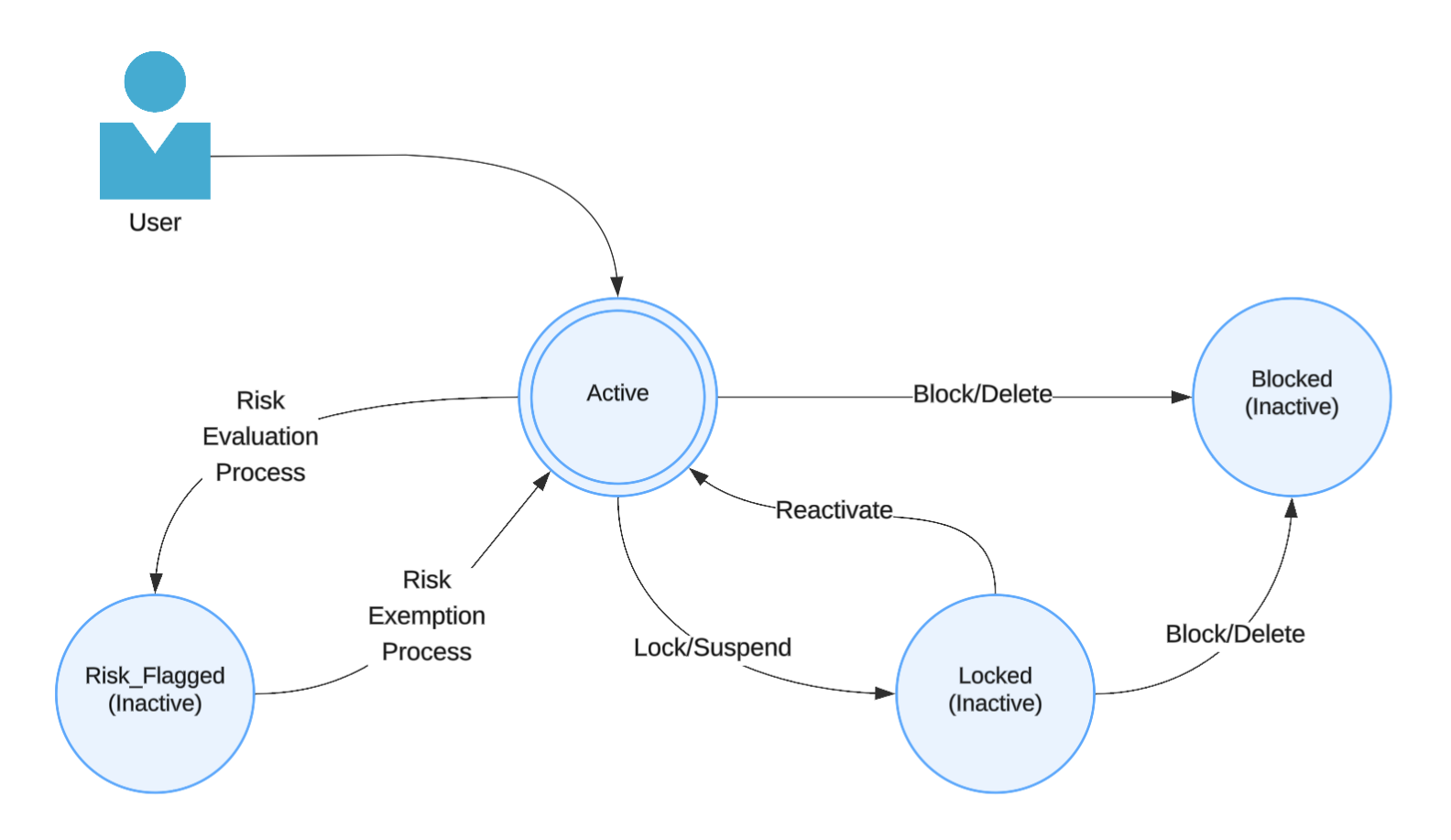
Onboard individuals and businesses for your program
The user is a fundamental entity that is created in the platform. User refers to an entity for which an account would be used, and then that entity can start leveraging the financial services you choose to consume from the platform.
Users can be of either an individual or a business type. Depending on the jurisdiction of the product, depending on the user type onboarded, and the capabilities required, every user will have to go through the customer onboarding and due diligence process, which involves multiple stages ranging from:
- Adverse media checks
- Politically exposed personality checks
- Sanction list checks
- Document verification / Document authentication processes (in some regions)
- Ongoing checks and monitoring
Onboarding individuals
Learn how to onboard individual users on the platform
Create an individual user profile
Register the profile of an individual for your program
Complete the individual KYC
Choose one of the available modes to complete the KYC for individuals for your program
Onboarding businesses
Learn how to onboard your business users on the platform
Create a business user profile
Register a business profile for your program
Update connected party details
Collect details of the connected party for the business
Complete the business KYB
Submit the required documents to complete the KYB for the business for your program
Identity Verification and Compliance
Identifying your customers is an integral part of any program, as compliance and regulatory guidelines are based entirely on the user types being served. MatchMove offers a range of state-of-the-art identification methods that comply with the KYC and KYB regulatory guidelines for every supported region. Our onboarding solutions are versatile, scalable, and suitable for various products and use cases, whether you're working with businesses or individual customers.
Regulatory restrictions
As a regulated platform, we ensure compliance with the licensing requirements in the respective jurisdiction. The links below highlight the applicable restrictions:
- Countries restricted from onboarding with SGD and USD accounts
- Countries requiring Enhanced Due Diligence (EDD) for SGD and USD accounts
- Industries prohibited for onboarding for businesses
- Industries require Enhanced Due Diligence (EDD) for businesses to onboard
Onboarding-related API and Webhooks
Individual Users
Individual Users
Individual User | Create / Reactivate User |
| Define a profile for an individual user / Unsuspend a suspended user |
Individual User | Get User |
| Retrieve a user profile |
Individual User | Update User |
| Update an individual user profile |
Individual User | Deactivate User |
| Suspend or delete an individual user |
Individual User | Updated User Addresses |
| Update individual user addresses |
Individual User | Get User Addresses |
| Retrieve individual user addresses |
Individual User | Update User Status |
| Upload KYC documents for a user |
KYC | Create KYC |
| Upload KYC documents for a user |
KYC | Confirm KYC |
| Submit uploaded KYC documents for approval |
KYC | Get KYC |
| Retrieve the KYC documents and status |
KYC | Get KYC Providers |
| Retrieve eKYC providers enabled in the program |
KYC | Process KYC Verification |
| Retrieve the eKYC capture link for a specified provider |
KYC | Remove KYC Document |
| Remove an uploaded KYC document |
User Enumerations | Get KYC Types |
| Retrieve supported KYC modes |
User Enumerations | Get KYC Document Types |
| Retrieve supported KYC document types |
User Enumerations | Get KYC ID Types |
| Retrieve supported KYC identification documents |
User Enumerations | Get Mobile Country Codes |
| Retrieve supported mobile country codes |
User Enumerations | Get Nationalities |
| Retrieve supported nationalities |
User Enumerations | Get User Titles |
| Retrieve supported user titles |
User Enumerations | Get Marital Status |
| Retrieve supported marital statuses |
User Enumerations | Get Genders |
| Retrieve supported genders |
User Enumerations | Get Employment Type |
| Retrieve supported employment types |
User Enumerations | Get Occupations |
| Retrieve supported occupations |
User Enumerations | Get Volume of Assets |
| Retrieve supported volumes of assets |
User Enumerations | Get Source of Income |
| Retrieve supported sources of income |
User Enumerations | Get States or Provinces |
| Retrieve supported states or provinces |
User Enumerations | Get Regions (line_4) |
| Retrieve supported regions or districts |
User Enumerations | Get Cities |
| Retrieve supported cities |
User Enumerations | Get Postal Codes |
| Retrieve supported postal codes |
User Profile Verification | Trigger Mobile Verification |
| Send an SMS OTP to the user |
User Profile Verification | Trigger Email Verification |
| Send an Email OTP to the user |
User Profile Verification | Resend OTP Verification |
| Resend an SMS/Email OTP to the user |
User Profile Verification | Verify OTP |
| Verify the OTP provided by the user using the platform |
User Profile Verification | Self-Verify OTP |
| Verify the OTP provided by the user using a partner verification mechanism |
User Profile Verification | Post-KYC Self-Verification |
| Verify Post-KYC approval profile updates using a partner verification mechanism |
Webhook Category (non-API) | OFAC Service Advisory | Webhook category to subscribe to receive notifications on Risk Evaluation status updates | |
Webhook Category (non-API) | User Details | Webhook category to subscribe to receive notifications on Profile Update status updates | |
Webhook Category (non-API) | KYC Service Advisory | Webhook category to subscribe to receive notifications to receive KYC Evaluation status updates |
Business Users
Business Users
Business User | Create / Reactivate Business User |
| Define a profile for a business user / Unsuspend a suspended business user |
Business User | Get Business User |
| Retrieve a business user profile |
Business User | Update Business User |
| Update a business user profile |
Business User | Update Business User Addresses |
| Update business user addresses |
Business User | Get Business User Addresses |
| Retrieve business user addresses |
Business Enumerations | Get Business Document Types |
| Retrieve supported KYB document types |
Business Enumerations | Get Business ID Types |
| Retrieve supported KYB identification documents |
Business Enumerations | Get Sources of Funds |
| Retrieve supported sources of funds |
Business Enumerations | Get Purposes of Business |
| Retrieve the supported purposes of business |
KYB | Create KYB |
| Upload KYB documents for a user |
KYB | Confirm KYB |
| Submit uploaded KYB documents for approval |
KYB | Get KYB |
| Retrieve the KYB documents and status |
Related Links


On this page
- Identity & onboarding overview