[v1] Onboard individual user
Understand the complete onboarding workflow for individual users, from profile registration to successful KYC verification. This guide provides a comprehensive overview of the steps needed to activate an individual's account.
Individual User onboarding involves the following processes:
Individual User Registration
The process involves capturing the required user information from the customer and submitting it to the platform to create a user profile or user entity that represents the customer. This process runs independently, but its states can be affected by the Risk Evaluation process. It is not affected by any activity in the KYC Verification process. However, its active state is required before the Risk Evaluation and KYC verification processes can be initiated.
Risk Evaluation
The process where the defined user profile containing the user information is checked against the various local and global financial blacklist and sanctioned personalities, to screen and prevent bad actors from gaining access to the financial capabilities of the platform. This process runs independently, but it requires the User state to be active for it to be initiated. It is not affected by any activity in the KYC Verification process.
KYC Verification
The process involves the uploading of the required customer KYC documents to the platform. The data presented in these KYC documents should correlate with and verify that the information provided in the user profile is legitimate and authentic. This process runs independently, but it requires the User state to be active for it to be initiated. It is not affected by any activity in the Risk Evaluation process.
Figure: User, Risk, and KYC interaction and state diagram
The state diagram below illustrates how the Individual User Definition, Risk Evaluation, and KYC Verification processes interact and affect one another.
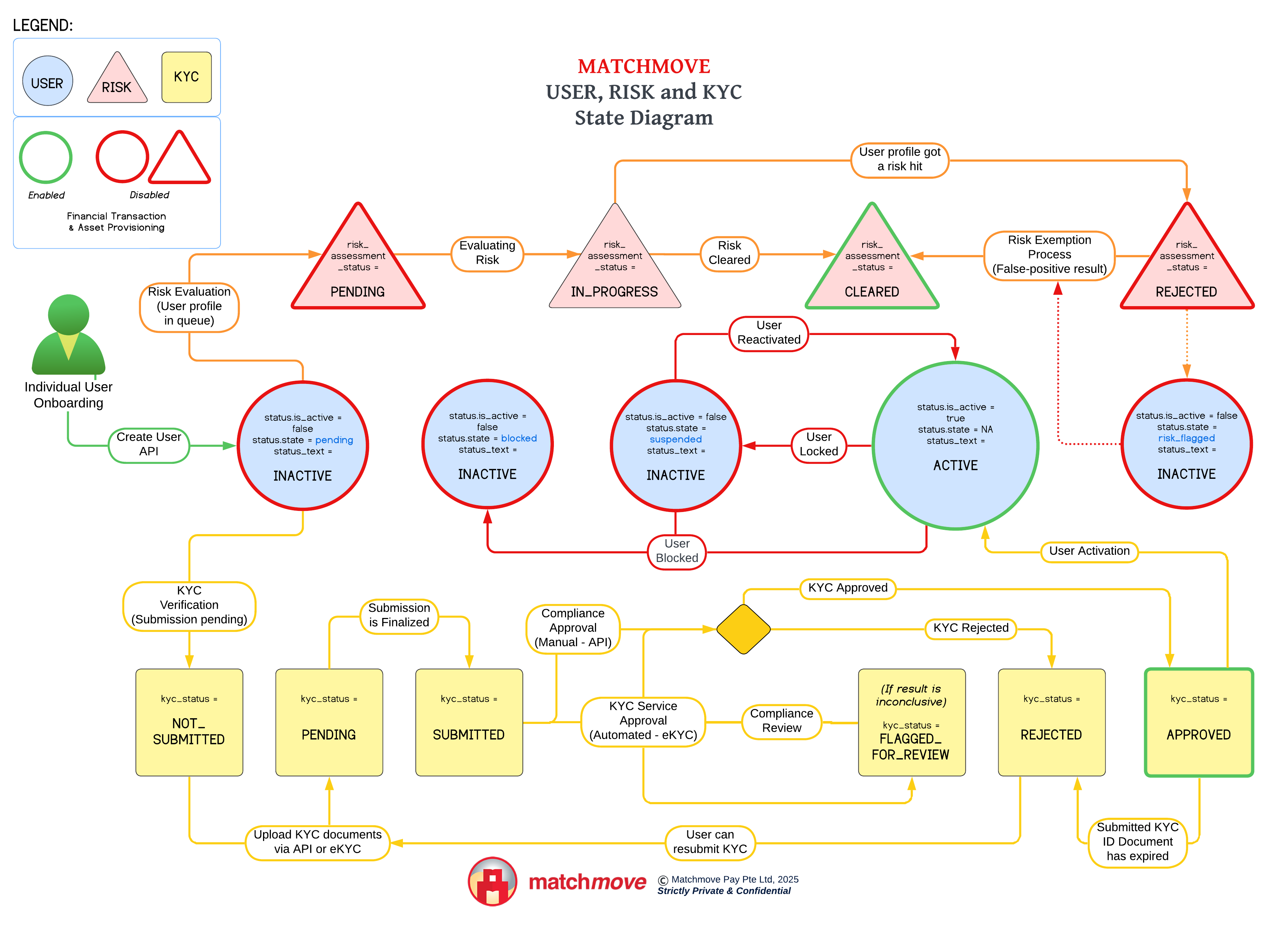
Before a user is granted access to any financial facilities and capabilities within the platform, the USER, RISK, and KYC must be in an approved or green status. These are the states depicted with a GREEN border:
Individual User Definition | user.status.text = ACTIVE | The user profile required information is completed |
Risk Evaluation | user.risk_assessment_status = CLEARED | The risk evaluation result did not garner any hits on the user profile when it was checked against all the available blacklists |
KYC Verification | kyc.kyc_status = APPROVED | The submitted KYC documents and data authenticated the legitimacy of the information in the user profile. |
Related Links


On this page
- [v1] Onboard individual user