Build with Gen AI
The Matchmove Developer document is LLM-friendly, allowing you to kickstart your development. As a developer or non-technical partner on the MatchMove Platform, you have a powerful suite of tools at your fingertips. This guide will show you how to leverage AI search and generative AI for code, streamlining your workflow and accelerating your projects with our Banking-as-a-Service (BaaS) and embedded finance solutions.
Use Ask AI to solve your queries
Forget sifting through endless documentation. Our AI-powered search is designed to give you precise, context-aware results instantly, making it easier than ever to find the information you need on the MatchMove platform.
Basic Search
The Basic Search capability involves searching through all the indexed articles.
- Click on the search bar located at the top of the developer portal page

2. Type in your MatchMove question. See the available resulting articles.
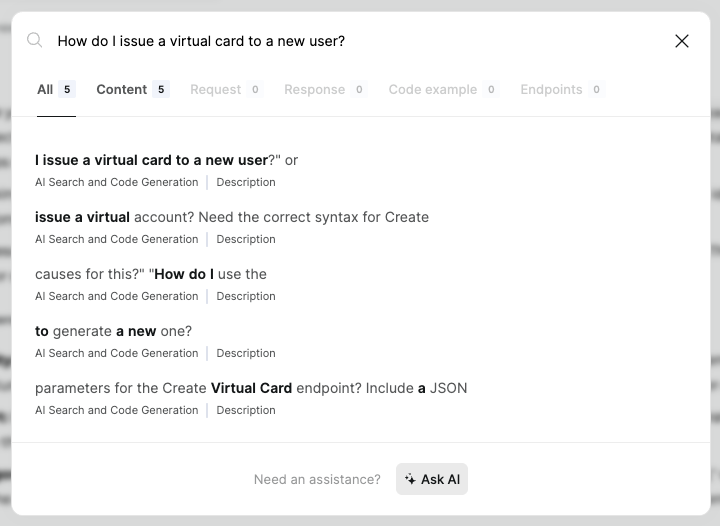
AI Search
The AI Search capability involves the AI models digesting through all available content and generating a contextual-aware response.
- Click on the
Ask AIbutton at the bottom of the Standard Search pop-up window.

2. The AI will go through the entire developer portal and will try to understand it. Then it will answer to the best of its knowledge, including platform context and relationships of the different MatchMove banking components.
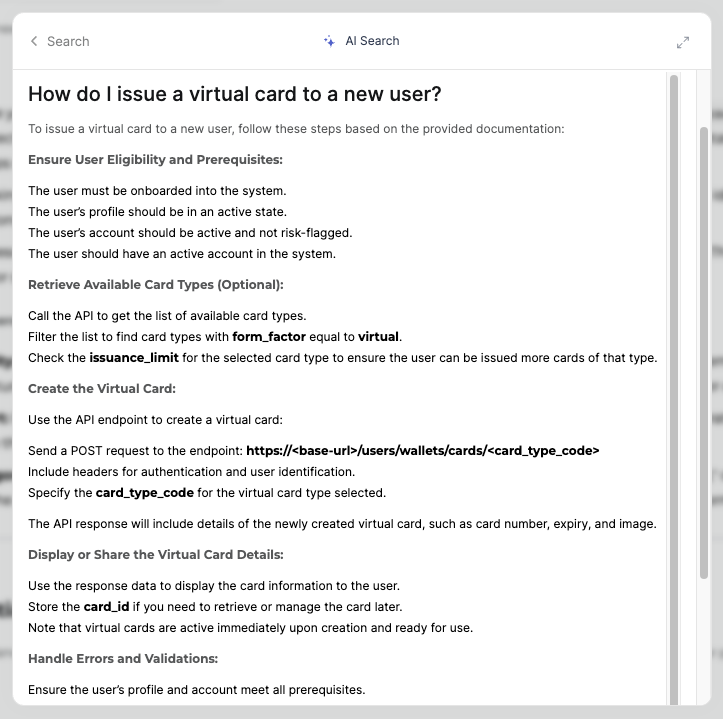
For technical stakeholders
Are you facing an error when trying to issue a virtual account? Need the correct syntax for creating an account at the endpoint? Just paste your query directly into the AI search. The AI understands your intent and provides relevant code snippets, documentation links, or troubleshooting steps specific to the MatchMove Banking API.
Best Practices: Looking for the most efficient way to handle a transaction webhook from our platform? The AI can surface idiomatic patterns and well-regarded solutions from our internal knowledge base.
Troubleshooting: Describe the symptoms of a bug, like a transaction status not updating correctly after a POST request. The AI can often point you to common causes or specific lines of code that might be responsible. For Non-Technical Partners:
For non-technical stakeholders
Finding Functionality: "How do I issue a virtual card to a new user?" or "Where can I find the dashboard for international remittances?" AI search allows you to ask natural language questions to discover platform features, even if you don't know the exact terminology for our services.
Self-Service Support: Before contacting our support team, try AI search. Many common questions about account configuration or user roles can be answered quickly by the AI, pulling information directly from our help articles and FAQs.
Understanding Jargon: If a developer or a report uses technical terms you're unfamiliar with—such as "Spend, Send, Lend," or "virtual account provisioning"—ask the AI. It will provide clear, concise explanations tailored to your understanding of the MatchMove platform.
Build with GenAI
Generative AI isn't just a fancy autocomplete; it's a powerful co-pilot that can write, refactor, and explain code, significantly boosting your productivity on the MatchMove platform.
Boilerplate Generation: Need a basic function to retrieve a user's balance or a standard component to display transaction history? Describe what you need, and the AI will generate the initial code, saving you time on repetitive tasks.
Code Completion: Beyond simple suggestions, Gen AI can propose entire blocks of code based on the context of your existing project, anticipating your next steps and offering efficient solutions.
Refactoring & Optimization: Got a piece of code that could be more readable or performant? Ask the AI to refactor it or suggest optimizations for more efficient handling of large data sets from our transaction endpoint.
Code Explanation: Need to quickly understand a legacy codebase or generate documentation? The AI can explain complex logic in plain language or create docstrings for you.
Unit Test Generation: Describe the functionality you want to test, and the AI will generate basic unit test cases, helping you achieve better code coverage faster.
Grounding: Ensuring Accuracy and Relevance
While incredibly powerful, generative AI models can sometimes "hallucinate" or provide plausible but incorrect information. This is where grounding becomes crucial. Grounding is the process of anchoring the AI's outputs to specific, verifiable data sources to ensure factual accuracy and contextual relevance.
How to Ground the AI Using MatchMove's Resources
As a developer, you are the most critical link in the grounding process. The most effective way to ensure accurate code generation is to direct the AI to the specific, trusted resources within the MatchMove ecosystem.
Reference the Developer Portal Directly
Our AI is trained on our official documentation, so a direct reference is the best way to get a precise response.
Provide Links to Relevant Articles: When asking a question, include a link to the specific page in the MatchMove Developer Portal that contains the relevant API documentation, SDK guide, or tutorial. | Based on the guide here: [link to article], generate a Python function to handle the KYC Advisory webhooks. |
Quote from the Documentation: If you have a specific piece of a sample request or an API endpoint description, copy and paste it into your prompt. This tells the AI exactly what to use. | Can you please read [link to article] and prepare to answer questions about it? Using the POST /v1/users/wallets/cards endpoint with the following request body: { 'id': 'string', 'card_type_code': 'mmvcard' }, generate a Node.js function. |
Iterate and Refine with Feedback Loops
Don't expect perfect code on the first try. The AI is a co-pilot, not an autonomous creator.
Refine Your Prompts: If the initial output is close but not quite right, provide a follow-up prompt that points out the error. | That's good, but it's missing the |
Signal to the AI When It's Incorrect: Use the feedback mechanisms within the AI tool to signal when a response is wrong. This helps the model learn and improves the quality of future suggestions for both you and your colleagues. | That's not what I need. Can you try to generate a new one? |
Validate and Test Every Output
This is the most crucial step. Treat AI-generated code as a starting point, not a final solution.
Perform a Manual Review: Check for security vulnerabilities, adherence to coding standards, and logical errors. Does the code correctly handle edge cases, like an empty API response or a malformed request? Run Automated Tests: Run unit tests and integration tests on the generated code. Ensure it works as expected and doesn't break existing functionality. Consult the Documentation: While the AI is a great shortcut, always cross-reference its suggestions with the official MatchMove API documentation to confirm accuracy.
Sample prompts to get started
To help you get the most out of these tools, here are some practical examples of effective prompts.
AI Search Prompts (for Developers & Non-Technical Partners):
"What are the required parameters for the Create Virtual Card endpoint? Include a JSON example." "I'm getting a 401 Unauthorized error when calling the Get KYC Documents endpoint. What are the common causes for this?" "How do I use the webhooks API to listen for successful payments?" "Where can I find my monthly transaction reports, and how do I download them as a CSV?" "Explain the difference between a virtual account and a physical card account."
Generative AI Code Prompts (for Developers):
Function Generation: "Write a Python function get_balance that takes a user_id and calls the MatchMove Banking API to return the current balance." Class & Module Creation: "Create a C# class named KYCWebhookHandler that has methods to handle incoming KYC approved and rejected webhook payload events from the MatchMove API." Refactoring: "Refactor the following JavaScript function to use a more modern async/await pattern for calling the Get Business User API.
Related Links


On this page
- Build with Gen AI